“这个模型 200 token/s” —— 但你的用户等了 3 秒才看到第一个字。
每次看到有人用 token/s 来评估 LLM 推理服务的性能,我都想问一句:那是谁的 token/s? 是空载单请求跑出来的?还是 100 个并发下的 P99?
200 token/s 的模型,在 50 并发下可能 P99 TTFT(Time to First Token)高达 8 秒。 你的用户盯着空白屏幕 8 秒,然后关掉了页面。
真正的瓶颈从来不是”模型能多快吐 token”。 而是:调度器怎么分配 GPU 资源、KV-Cache 怎么管理显存、尾部请求为什么被饿死。
这篇文章从推理的两个阶段讲起,一路拆到 vLLM 的 PagedAttention、continuous batching、尾延迟的来源,最后给出工程实践建议。如果你在做 LLM 推理服务,或者在选型推理框架,这篇应该能帮到你。
一、LLM 推理的两个阶段
LLM 推理不是一个均匀的过程。它有两个性质完全不同的阶段,理解这个区分是理解所有后续优化的前提。
Prefill(提示词处理)
用户发送一段 prompt 过来,模型需要先把整个 prompt “读一遍”——计算每一层的 attention 和 FFN,生成所有 token 位置的 KV-Cache。
Prefill 的特点:
- 计算密集(compute-bound):所有 token 可以并行计算
- GPU 的算力利用率很高,矩阵乘法(GEMM)可以充分利用 Tensor Core
- 时间与 prompt 长度成正比
- 这个阶段决定了 TTFT(Time to First Token)
一个 2048 token 的 prompt 在 A100 上的 prefill 时间,对于 13B 模型大约是 200-500ms。
Decode(逐 token 生成)
Prefill 结束后,模型进入 decode 阶段:每次只生成一个 token,然后把它追加到序列末尾,更新 KV-Cache,再用新的 KV-Cache 生成下一个 token。
Decode 的特点:
- 内存带宽密集(memory-bound):每次只处理 1 个 token,但要读取整个模型权重
- GPU 算力利用率极低,大部分时间在等数据从显存搬到计算单元
- 串行生成,无法并行
这就是为什么 decode 阶段的瓶颈是显存带宽而不是算力。
一道简单的算术题
假设一个 13B 模型(FP16,约 26GB 权重),A100 的显存带宽是 2TB/s:
# Decode 阶段每生成一个 token 需要读取全部模型权重
model_size_bytes = 13e9 * 2       # 13B params × 2 bytes (FP16) = 26GB
memory_bandwidth = 2e12            # A100: 2 TB/s

# 理论最大 token 生成速度(单请求)
max_tokens_per_sec = memory_bandwidth / model_size_bytes
print(f"理论上限: {max_tokens_per_sec:.0f} token/s")   # ≈ 77 token/s

# 实际还要读 KV-Cache,所以更低
# 这就是为什么单请求 decode 速度很难超过 60-80 token/s
注意看:A100 有 312 TFLOPS 的 FP16 算力,但 decode 阶段根本用不满。每个 token 的计算量太小,GPU 一直在”等数据”。
TTFT vs TPS
| 指标 | 含义 | 影响因素 | 用户感知 |
|---|---|---|---|
| TTFT | 首 token 延迟 | prefill 时间 + 排队时间 | 用户等待第一个字出现 |
| TPS | 生成速度 | decode 速度 × batch 大小 | 文字流出的速度 |
| P99 TTFT | 尾部延迟 | 调度策略 + 负载 | 最惨的 1% 用户体验 |
大多数 benchmark 只报 TPS,但用户体验主要取决于 TTFT 和 P99 延迟。
二、KV-Cache:显存杀手
为什么需要 KV-Cache
Transformer 的自注意力机制在生成第 \(t\) 个 token 时,需要和之前所有 \(t-1\) 个 token 做 attention 计算。如果每次都重新算所有历史 token 的 key 和 value,计算量是 \(O(t^2)\),完全不可接受。
所以我们把每一层的 key 和 value 向量缓存起来,这就是 KV-Cache。decode 阶段每生成一个新 token,只需要计算这一个 token 的 query,然后和缓存的所有 key 做 attention。
KV-Cache 到底有多大
计算公式:
\[\text{KV-Cache Size} = 2 \times L \times H \times d \times s \times \text{dtype\_size}\]
其中: - \(2\):key 和 value 各一份 - \(L\):Transformer 层数 - \(H\):注意力头数 - \(d\):每个头的维度 - \(s\):序列长度 - \(\text{dtype\_size}\):数据类型大小(FP16 = 2 bytes)
def calc_kv_cache_size(
    num_layers: int,
    num_heads: int,
    head_dim: int,
    seq_len: int,
    dtype_bytes: int = 2,   # FP16
) -> dict:
    """计算单个请求的 KV-Cache 大小"""
    # 每个 token 的 KV 大小
    per_token = 2 * num_layers * num_heads * head_dim * dtype_bytes

    # 整个序列
    total_bytes = per_token * seq_len
    total_mb = total_bytes / (1024 ** 2)
    total_gb = total_bytes / (1024 ** 3)

    return {
        "per_token_bytes": per_token,
        "total_bytes": total_bytes,
        "total_mb": round(total_mb, 2),
        "total_gb": round(total_gb, 4),
    }


# LLaMA-2 13B 参数
result = calc_kv_cache_size(
    num_layers=40,
    num_heads=40,
    head_dim=128,
    seq_len=4096,
)
print(f"单请求 KV-Cache: {result['total_mb']} MB")
# → 单请求 KV-Cache: 2560.0 MB ≈ 2.5 GB

# 如果你想同时服务 10 个请求?
print(f"10 个并发: {result['total_gb'] * 10:.1f} GB")
# → 10 个并发: 25.0 GB
# A100 80GB 显存,模型本身占 26GB,剩下 54GB
# 最多同时服务 ~21 个请求(理论值,实际更少)
2.5 GB 一个请求。这就是为什么大模型推理的并发数上不去。显存不够不是因为模型太大,而是 KV-Cache 太大。
KV-Cache 碎片化
传统做法是给每个请求预分配最大序列长度(比如 4096)的连续显存。问题是:
- 内部碎片:大多数请求用不满 4096 tokens,剩下的空间浪费了
- 外部碎片:请求结束释放显存后,留下大小不一的空洞
- 利用率低:实际显存利用率可能只有 20-40%
这跟内存分配器面临的碎片化问题一模一样。如果你读过我写的 内存分配器的竞技场,应该很熟悉这个故事——连续分配看起来简单,但在动态负载下碎片会杀死你。
三、PagedAttention 和 vLLM
传统方法的困境
在 vLLM 出现之前,LLM 推理服务(比如 HuggingFace TGI 早期版本)通常这样管理 KV-Cache:
# 传统方式:预分配连续显存
# 问题:max_seq_len=4096,但平均只用 500 tokens
class NaiveKVCache:
    def __init__(self, max_batch_size, max_seq_len, num_layers, num_heads, head_dim):
        # 一次性分配所有显存,不管实际用多少
        self.k_cache = torch.zeros(
            max_batch_size, num_layers, max_seq_len, num_heads, head_dim,
            dtype=torch.float16, device="cuda"
        )
        self.v_cache = torch.zeros(
            max_batch_size, num_layers, max_seq_len, num_heads, head_dim,
            dtype=torch.float16, device="cuda"
        )
        # max_batch_size=16, max_seq_len=4096, 13B 模型
        # → 预分配 16 × 2.5GB = 40GB
        # 但如果平均只用 500 tokens → 实际利用率 12.2%
PagedAttention:虚拟内存的思路
vLLM 的核心创新 PagedAttention 直接借鉴了操作系统的虚拟内存管理:
- KV-Cache 不再要求连续存储
- 把显存分成固定大小的 block(类似内存页,通常 16 tokens)
- 每个请求有一个 block table(类似页表),记录逻辑 block 到物理 block 的映射
- 新 token 产生时按需分配新 block
# PagedAttention 的核心概念(简化示意)
class PagedKVCacheManager:
    """类似操作系统的页式内存管理"""

    def __init__(self, num_gpu_blocks: int, block_size: int = 16):
        self.block_size = block_size       # 每个 block 存 16 个 token 的 KV
        self.num_gpu_blocks = num_gpu_blocks
        self.free_blocks: list[int] = list(range(num_gpu_blocks))
        self.block_tables: dict[int, list[int]] = {}   # request_id → [block_ids]

    def allocate(self, request_id: int) -> int:
        """为请求分配一个新的物理 block"""
        if not self.free_blocks:
            raise RuntimeError("GPU blocks exhausted — need preemption")
        block_id = self.free_blocks.pop()
        if request_id not in self.block_tables:
            self.block_tables[request_id] = []
        self.block_tables[request_id].append(block_id)
        return block_id

    def free(self, request_id: int):
        """请求完成,归还所有 block"""
        blocks = self.block_tables.pop(request_id, [])
        self.free_blocks.extend(blocks)

    def get_physical_blocks(self, request_id: int) -> list[int]:
        """获取请求的物理 block 列表(供 PagedAttention kernel 使用)"""
        return self.block_tables.get(request_id, [])

    def num_free_blocks(self) -> int:
        return len(self.free_blocks)


# 示例:一个 block 存 16 tokens 的 KV
# 请求 A 用了 100 tokens → 需要 ceil(100/16) = 7 个 block
# 请求 B 用了 30 tokens  → 需要 ceil(30/16)  = 2 个 block
# 不需要预分配 max_seq_len,按需增长
vLLM 架构全景
vLLM 的架构由三个核心组件构成(参见下方架构图):
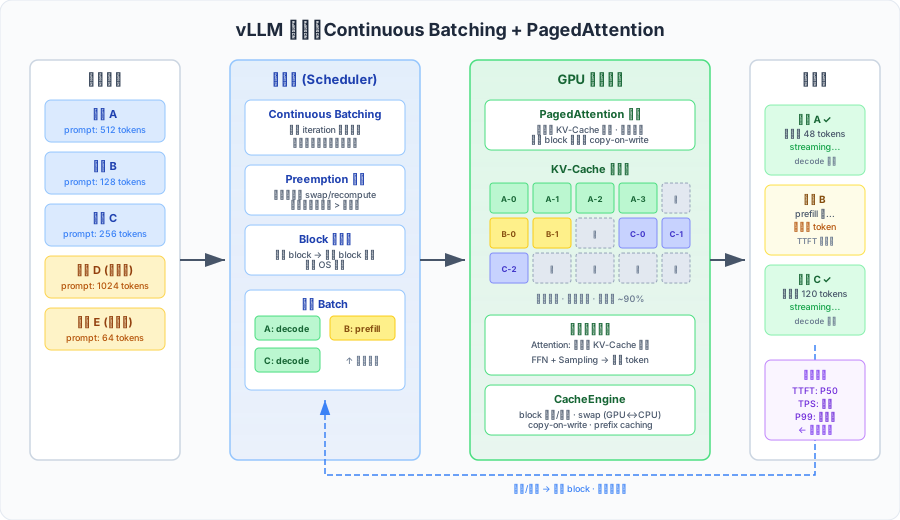
1. Scheduler(调度器)
- 维护请求队列(waiting / running / swapped 三个队列)
- 每个 iteration 决定哪些请求参与本轮 batch
- 管理逻辑 block 到物理 block 的映射表
- 执行 preemption 策略(显存不够时把低优先级请求的 KV-Cache swap 到 CPU)
2. PagedAttention Kernel(GPU 内核)
- 自定义 CUDA kernel,支持从非连续的物理 block 读取 KV-Cache
- 根据 block table 做间接寻址,类似 CPU 的 MMU
- 支持 block 级别的 copy-on-write(用于 beam search 和 parallel sampling)
3. CacheEngine(缓存引擎)
- 管理 GPU 和 CPU 的物理 block 池
- 执行 GPU ↔︎ CPU 的 block 交换(swap in/out)
- 实现 prefix caching:共享相同前缀的 KV-Cache block
从 vLLM 源码看 Scheduler
光看架构图还不够,我们扒一下 vLLM 的调度器源码,看看它每一步到底在做什么。以下是基于 vLLM v0.4.x 的核心逻辑简化——真实代码更复杂,但骨架就是这样。
# vLLM Scheduler 核心逻辑(简化伪代码)
# 参考:vllm/core/scheduler.py

class Scheduler:
    def __init__(self, scheduler_config, cache_config):
        # 三个队列——这是调度器的全部状态
        self.waiting: deque[SequenceGroup] = deque()   # 新来的请求,还没开始 prefill
        self.running: deque[SequenceGroup] = deque()   # 正在 GPU 上跑的请求
        self.swapped: deque[SequenceGroup] = deque()   # KV-Cache 被换到 CPU 的请求

    def schedule(self) -> SchedulerOutputs:
        """每个 iteration 调用一次,决定本轮 batch 的组成"""
        budget = SchedulingBudget(
            token_budget=self.scheduler_config.max_num_batched_tokens,
            max_num_seqs=self.scheduler_config.max_num_seqs,
        )

        # 第一步:处理 running 队列(已在 GPU 上的请求)
        # 如果显存紧张,需要 preempt 一些请求腾出空间
        running_scheduled, preempted = self._schedule_running(budget)

        # 被 preempt 的请求根据策略处理:
        for seq_group in preempted:
            if self.preemption_mode == "recompute":
                # 丢弃 KV-Cache,回到 waiting 队列重新 prefill
                self._free_blocks(seq_group)
                self.waiting.appendleft(seq_group)  # 放到队首,优先调度
            elif self.preemption_mode == "swap":
                # KV-Cache 从 GPU 搬到 CPU,进入 swapped 队列
                self._swap_out(seq_group)
                self.swapped.append(seq_group)

        # 第二步:处理 swapped 队列(尝试把之前换出的请求换回来)
        # 只有 running 的请求都安排好了,才考虑 swap in
        swapped_in = self._schedule_swapped(budget)

        # 第三步:处理 waiting 队列(新请求的 prefill)
        # 只有前两步都搞定了,剩余 budget 才给新请求
        prefills = self._schedule_prefills(budget)

        return SchedulerOutputs(
            scheduled_seq_groups=running_scheduled + swapped_in + prefills,
            blocks_to_swap_in={...},    # CPU → GPU 的 block 映射
            blocks_to_swap_out={...},   # GPU → CPU 的 block 映射
            blocks_to_copy={...},       # CoW 触发的 block 复制
        )

    def _schedule_running(self, budget) -> tuple[list, list]:
        """检查 running 队列里的请求是否都能分配到新的 block"""
        scheduled, preempted = [], []
        for seq_group in self.running:
            if self._can_allocate_one_block(seq_group):
                budget.consume(num_tokens=1, num_seqs=1)  # decode 每步只需 1 token
                scheduled.append(seq_group)
            else:
                # 显存不够了——从队尾开始 preempt(LIFO,最新的请求先被抢占)
                preempted.append(seq_group)
        return scheduled, preempted
几个关键设计决策:
- 三级优先级:running > swapped > waiting。正在跑的请求永远优先——因为它们已经消耗了 GPU 算力做 prefill,preempt 它们的沉没成本最高。
- Recompute vs Swap 的选择:短序列用 recompute(重新 prefill 很快),长序列用 swap(重新算太贵)。vLLM 默认策略是根据序列长度自动选择。
- Budget
控制:
max_num_batched_tokens和max_num_seqs同时限制——前者控制 GPU 计算量,后者控制显存占用。两个任意一个超了就停止调度。 - LIFO preemption:最后加入的请求最先被抢占。直觉是:新请求生成的 token 少,丢弃/swap 的代价最小。
显存利用率的飞跃
# 对比:传统方法 vs PagedAttention 的显存利用率
def compare_memory_efficiency(
    gpu_memory_gb: float,
    model_size_gb: float,
    kv_per_token_bytes: int,
    avg_seq_len: int,
    max_seq_len: int,
    block_size: int = 16,
):
    available = (gpu_memory_gb - model_size_gb) * (1024 ** 3)  # bytes

    # 传统方法:预分配 max_seq_len
    naive_per_request = kv_per_token_bytes * max_seq_len
    naive_max_batch = int(available / naive_per_request)
    naive_actual_usage = (avg_seq_len / max_seq_len)   # 内部碎片

    # PagedAttention:按需分配,block 粒度
    import math
    paged_per_request = kv_per_token_bytes * math.ceil(avg_seq_len / block_size) * block_size
    paged_max_batch = int(available / paged_per_request)
    paged_actual_usage = avg_seq_len / (math.ceil(avg_seq_len / block_size) * block_size)

    return {
        "naive_max_batch": naive_max_batch,
        "naive_utilization": f"{naive_actual_usage:.1%}",
        "paged_max_batch": paged_max_batch,
        "paged_utilization": f"{paged_actual_usage:.1%}",
        "throughput_improvement": f"{paged_max_batch / naive_max_batch:.1f}x",
    }


result = compare_memory_efficiency(
    gpu_memory_gb=80,            # A100 80GB
    model_size_gb=26,            # 13B FP16
    kv_per_token_bytes=655360,   # 2 × 40 × 40 × 128 × 2 bytes
    avg_seq_len=500,
    max_seq_len=4096,
    block_size=16,
)
print(result)
# naive_max_batch: 14
# naive_utilization: 12.2%
# paged_max_batch: 112
# paged_utilization: 97.7%
# throughput_improvement: 8.0x
vLLM 基本使用
from vllm import LLM, SamplingParams

# 初始化模型——vLLM 自动设置 PagedAttention 和 KV-Cache 管理
llm = LLM(
    model="meta-llama/Llama-2-13b-chat-hf",
    tensor_parallel_size=1,          # 单卡
    gpu_memory_utilization=0.90,     # 使用 90% 显存给 KV-Cache
    max_model_len=4096,
    block_size=16,                   # KV-Cache block 大小
    swap_space=4,                    # CPU swap 空间 (GB)
    enforce_eager=False,             # 使用 CUDA graph 加速
)

sampling_params = SamplingParams(
    temperature=0.7,
    top_p=0.9,
    max_tokens=512,
)

# 批量推理——vLLM 内部使用 continuous batching
prompts = [
    "解释什么是 PagedAttention",
    "用 Python 写一个快速排序",
    "Transformer 的自注意力机制是如何工作的",
]

outputs = llm.generate(prompts, sampling_params)

for output in outputs:
    prompt = output.prompt
    generated_text = output.outputs[0].text
    print(f"Prompt: {prompt[:40]}...")
    print(f"Output: {generated_text[:100]}...")
    print(f"Tokens generated: {len(output.outputs[0].token_ids)}")
    print("---")
# 在线服务模式(OpenAI 兼容 API)
# 启动命令:
# python -m vllm.entrypoints.openai.api_server \
# --model meta-llama/Llama-2-13b-chat-hf \
# --gpu-memory-utilization 0.9 \
# --max-model-len 4096
import openai
client = openai.OpenAI(
base_url="http://localhost:8000/v1",
api_key="not-needed",
)
# Streaming 模式——用户可以看到 token 逐个出现
stream = client.chat.completions.create(
model="meta-llama/Llama-2-13b-chat-hf",
messages=[{"role": "user", "content": "什么是 KV-Cache?"}],
stream=True,
max_tokens=256,
)
for chunk in stream:
if chunk.choices[0].delta.content:
print(chunk.choices[0].delta.content, end="", flush=True)四、Continuous Batching
静态 Batching 的问题
传统的静态 batching 像餐厅的翻台制:一桌人全部吃完才能安排下一桌。
# 静态 batching 的问题示意
import time

class StaticBatchScheduler:
    """所有请求必须等最慢的那个完成"""

    def __init__(self, max_batch_size: int):
        self.max_batch_size = max_batch_size

    def process_batch(self, requests: list[dict]) -> list[dict]:
        batch = requests[:self.max_batch_size]
        max_output_len = max(r["expected_output_len"] for r in batch)

        results = []
        # 问题:短请求生成完了也要等长请求
        for step in range(max_output_len):
            for req in batch:
                if step < req["expected_output_len"]:
                    # 还在生成
                    req.setdefault("tokens", []).append(f"tok_{step}")
                else:
                    # 已经结束了,但 GPU 资源仍被占用!
                    pass    # ← 浪费

        return batch


# 例子:4 个请求,输出长度差异很大
requests = [
    {"id": "A", "expected_output_len": 10},    # 很快就完了
    {"id": "B", "expected_output_len": 200},   # 要生成很长
    {"id": "C", "expected_output_len": 15},    # 很快
    {"id": "D", "expected_output_len": 180},   # 也很长
]
# 请求 A 和 C 在第 15 步就完成了
# 但要等到第 200 步(B 完成)才能处理新请求
# GPU 利用率: (10+200+15+180) / (200×4) = 50.6%
Iteration-Level Scheduling
Continuous batching(也叫 iteration-level scheduling)的核心思想来自 Orca 论文(Yu et al., 2022):
不在 request 级别组 batch,而是在 每个 decode step 重新调度。
class ContinuousBatchScheduler:
    """每个 decode iteration 重新调度"""

    def __init__(self, max_batch_size: int, max_blocks: int):
        self.max_batch_size = max_batch_size
        self.max_blocks = max_blocks
        self.waiting: list[dict] = []     # 等待执行的请求
        self.running: list[dict] = []     # 正在执行的请求

    def add_request(self, request: dict):
        self.waiting.append(request)

    def schedule_step(self) -> list[dict]:
        """每个 iteration 调用一次"""
        # 1. 移除已完成的请求,释放资源
        still_running = []
        for req in self.running:
            if req["generated_tokens"] >= req["max_tokens"]:
                self._free_blocks(req)
                req["status"] = "completed"
            elif req.get("eos_generated"):
                self._free_blocks(req)
                req["status"] = "completed"
            else:
                still_running.append(req)
        self.running = still_running

        # 2. 空出来的位置可以立即给新请求
        while (
            self.waiting
            and len(self.running) < self.max_batch_size
            and self._has_free_blocks()
        ):
            new_req = self.waiting.pop(0)
            new_req["status"] = "running"
            new_req["generated_tokens"] = 0
            self._allocate_blocks(new_req)
            self.running.append(new_req)

        return self.running

    def _has_free_blocks(self) -> bool:
        used = sum(r.get("num_blocks", 1) for r in self.running)
        return used < self.max_blocks

    def _allocate_blocks(self, request: dict):
        request["num_blocks"] = 1    # 初始分配

    def _free_blocks(self, request: dict):
        request["num_blocks"] = 0


# 关键区别:
# 静态 batch:[A, B, C, D] 一起跑,A 完了也要等 B
# Continuous batch:A 完了 → 立刻把 E 塞进来
# GPU 始终在做有用的工作
Preemption 策略
当显存不够容纳所有 running 请求的 KV-Cache 时,调度器需要做 preemption:
| 策略 | 做法 | 优点 | 缺点 |
|---|---|---|---|
| Swap | 把 KV-Cache 搬到 CPU 内存 | 不丢失计算结果 | PCIe 传输慢 |
| Recompute | 丢弃 KV-Cache,之后重新 prefill | 不占 CPU 内存 | 浪费 GPU 算力 |
| Drop | 直接丢弃请求 | 最简单 | 用户体验最差 |
vLLM 默认使用 swap 策略,显存紧张时将低优先级请求的 KV-Cache block 异步搬到 CPU:
# vLLM 的 preemption 逻辑(简化)
def handle_preemption(scheduler, running_requests, new_request):
    """显存不足时的处理"""
    # 按优先级排序:已生成更多 token 的请求优先级更低
    # (因为重新计算的代价更高,所以实际策略更复杂)
    candidates = sorted(running_requests, key=lambda r: r["generated_tokens"])

    freed_blocks = 0
    preempted = []

    for req in candidates:
        if freed_blocks >= new_request["required_blocks"]:
            break
        # Swap KV-Cache to CPU
        freed_blocks += req["num_blocks"]
        req["status"] = "swapped"
        preempted.append(req)

    return preempted
吞吐量 vs 延迟的权衡
Continuous batching 的一个微妙问题:batch 越大,吞吐量越高,但单个请求的 decode 延迟也越高。
# 吞吐量-延迟权衡的直觉
def throughput_latency_tradeoff(
    model_size_gb: float,
    memory_bandwidth_tb: float,
    batch_sizes: list[int],
):
    """展示 batch size 对吞吐量和延迟的影响"""
    model_bytes = model_size_gb * 1e9
    bw = memory_bandwidth_tb * 1e12

    results = []
    for bs in batch_sizes:
        # 每个 decode step 需要读取一次模型权重
        # batch 内所有请求共享这次读取
        time_per_step = model_bytes / bw                 # 秒
        throughput = bs / time_per_step                  # tokens/s (所有请求)
        per_request_latency = time_per_step * 1000       # ms (每个 token)

        results.append({
            "batch_size": bs,
            "throughput_tps": round(throughput, 1),
            "per_token_latency_ms": round(per_request_latency, 2),
        })

    return results


# A100 + 13B FP16
results = throughput_latency_tradeoff(
    model_size_gb=26,
    memory_bandwidth_tb=2.0,
    batch_sizes=[1, 4, 8, 16, 32, 64],
)
for r in results:
    print(f"batch={r['batch_size']:3d}  "
          f"throughput={r['throughput_tps']:8.1f} tok/s  "
          f"per_token={r['per_token_latency_ms']:.2f} ms")

# batch=  1  throughput=    76.9 tok/s  per_token=13.00 ms
# batch=  4  throughput=   307.7 tok/s  per_token=13.00 ms
# batch=  8  throughput=   615.4 tok/s  per_token=13.00 ms
# batch= 16  throughput=  1230.8 tok/s  per_token=13.00 ms
# batch= 32  throughput=  2461.5 tok/s  per_token=13.00 ms
# batch= 64  throughput=  4923.1 tok/s  per_token=13.00 ms
# ↑ 理想情况下 batch 越大吞吐越高,per-token 延迟不变
# 但实际上大 batch 会增加 KV-Cache 读取量和调度开销
理论上看起来很美——batch 越大,吞吐线性增长。但实际上: - 大 batch 意味着 KV-Cache 占更多显存,每个 attention 要读更大的 KV - Prefill 和 decode 混合调度时,长 prefill 会阻塞所有 decode 请求 - 排队的请求 TTFT 在增长
Orca 论文的核心洞察:与其优化单请求速度,不如优化整个系统的调度效率。让 GPU 每个 cycle 都在做有价值的计算。
五、尾延迟的来源
你的 P50 延迟可能很好看。但 P99 才是真正的杀手——那 1% 最惨的用户,可能等了 10 秒才看到第一个字。
排队延迟
最常见也最容易被忽视的延迟来源。当所有 GPU block 都被占满时,新请求只能排队等待。
import numpy as np

def simulate_queue_delay(
    arrival_rate: float,        # 请求/秒
    avg_prefill_time: float,    # 秒
    avg_decode_time: float,     # 秒
    max_concurrent: int,        # 最大并发数
    num_requests: int = 10000,
    seed: int = 42,
):
    """模拟请求排队延迟(简化 M/G/c 队列)"""
    rng = np.random.default_rng(seed)

    # 生成请求到达时间(泊松过程)
    inter_arrivals = rng.exponential(1.0 / arrival_rate, num_requests)
    arrival_times = np.cumsum(inter_arrivals)

    # 每个请求的服务时间
    prefill_times = rng.exponential(avg_prefill_time, num_requests)
    output_lens = rng.geometric(1.0 / 100, num_requests)  # 平均 100 tokens
    decode_times = output_lens * avg_decode_time

    total_service = prefill_times + decode_times

    # 模拟 c 个服务器
    server_free_at = np.zeros(max_concurrent)
    ttft_list = []

    for i in range(num_requests):
        # 找最早空闲的服务器
        earliest_server = np.argmin(server_free_at)
        start_time = max(arrival_times[i], server_free_at[earliest_server])
        queue_delay = start_time - arrival_times[i]
        ttft = queue_delay + prefill_times[i]
        ttft_list.append(ttft)
        server_free_at[earliest_server] = start_time + total_service[i]

    ttft_arr = np.array(ttft_list)
    return {
        "P50_TTFT": f"{np.percentile(ttft_arr, 50)*1000:.0f} ms",
        "P95_TTFT": f"{np.percentile(ttft_arr, 95)*1000:.0f} ms",
        "P99_TTFT": f"{np.percentile(ttft_arr, 99)*1000:.0f} ms",
        "max_TTFT": f"{np.max(ttft_arr)*1000:.0f} ms",
    }


# 场景:20 req/s,最多 16 并发
result = simulate_queue_delay(
    arrival_rate=20,
    avg_prefill_time=0.3,
    avg_decode_time=0.013,
    max_concurrent=16,
)
print(result)
# 典型输出:
# P50_TTFT: 320 ms      ← 看起来不错
# P95_TTFT: 2800 ms     ← 开始不妙了
# P99_TTFT: 5200 ms     ← 5 秒!
# max_TTFT: 12000 ms    ← 有人等了 12 秒
Preemption 导致的重计算
当请求被 preempt 后恢复执行,如果使用 recompute 策略,需要重新做一次 prefill。对于长 prompt 的请求,这可能意味着额外的数百毫秒延迟。
更坏的情况:一个请求可能被 preempt 多次。每次恢复都要重新计算已有的 KV-Cache,形成”饥饿”现象。
KV-Cache Eviction 和 Recomputation
当系统决定驱逐某个请求的 KV-Cache 时:
# KV-Cache eviction 的代价
def eviction_cost(
    prompt_len: int,
    generated_len: int,
    prefill_speed_tokens_per_sec: int = 10000,
    decode_speed_tokens_per_sec: int = 60,
):
    """被驱逐的请求恢复执行需要多长时间"""
    # 需要重新 prefill 整个上下文(prompt + 已生成的 tokens)
    total_context = prompt_len + generated_len
    recompute_time = total_context / prefill_speed_tokens_per_sec

    return {
        "recompute_context_tokens": total_context,
        "recompute_time_ms": round(recompute_time * 1000, 1),
        "wasted_decode_time_ms": round(generated_len / decode_speed_tokens_per_sec * 1000, 1),
    }


# 一个已经生成了 200 tokens 的请求被驱逐
cost = eviction_cost(prompt_len=1024, generated_len=200)
print(cost)
# recompute_context_tokens: 1224
# recompute_time_ms: 122.4 ms       ← 重新 prefill 的时间
# wasted_decode_time_ms: 3333.3 ms  ← 之前 decode 的工作白费了
模型加载和热启动
在弹性伸缩场景下,冷启动是另一个尾延迟的来源:
- 模型加载:13B 模型从磁盘加载到 GPU 需要 10-30 秒
- CUDA kernel 编译:首次运行的 kernel 需要 JIT 编译
- KV-Cache 预热:空的缓存池需要逐步填充
实际延迟分析
综合以上因素,一个生产环境的延迟分布通常长这样:
| 延迟来源 | P50 影响 | P95 影响 | P99 影响 |
|---|---|---|---|
| Prefill 计算 | 200ms | 500ms | 800ms |
| 排队等待 | ~0ms | 1500ms | 4000ms |
| Preemption 恢复 | ~0ms | ~0ms | 2000ms |
| KV-Cache swap | ~0ms | 100ms | 500ms |
| 网络/框架开销 | 10ms | 20ms | 50ms |
| 总计 TTFT | ~210ms | ~2100ms | ~7350ms |
P99 是 P50 的 35 倍。这就是为什么只看平均延迟会让你产生错误的安全感。
这和序列化选型的道理一样——benchmark 数字好看不代表上了生产环境还好看。如果你读过 序列化的真实代价,你知道”快 10 倍”的 benchmark 到了真实负载下可能完全不成立。尾延迟也是:只有压测到 P99 才能看到系统的真实瓶颈。
六、优化工程实践
知道了瓶颈在哪,来看看工程上怎么优化。
Speculative Decoding
核心思想:用一个小模型(draft model)快速”猜”接下来几个 token,然后让大模型一次性验证。
# ⚠️ 概念示意代码,非可直接运行。实际实现参见 vLLM 的 spec_decode 模块
def speculative_decode_step(
    draft_model,
    target_model,
    input_ids,
    num_speculative_tokens: int = 5,
):
    """Speculative decoding 的一个 step(概念示意)"""
    # 1. Draft model 快速生成 K 个候选 token
    draft_tokens = []
    draft_probs = []
    current = input_ids

    for _ in range(num_speculative_tokens):
        logits = draft_model(current)
        prob = softmax(logits[:, -1, :])
        token = sample(prob)
        draft_tokens.append(token)
        draft_probs.append(prob)
        current = concat(current, token)

    # 2. Target model 一次前向传播验证所有候选
    # 关键:验证 K 个 token 只需要 1 次前向传播(类似 prefill)
    all_candidates = concat(input_ids, stack(draft_tokens))
    target_logits = target_model(all_candidates)

    # 3. 逐个检查 draft token 是否被 target 接受
    accepted_tokens = []
    for i, (draft_tok, draft_prob) in enumerate(zip(draft_tokens, draft_probs)):
        target_prob = softmax(target_logits[:, len(input_ids) + i, :])
        # 改进的拒绝采样:保证输出分布和 target model 完全一致
        acceptance_rate = min(1, target_prob[draft_tok] / draft_prob[draft_tok])
        if random() < acceptance_rate:
            accepted_tokens.append(draft_tok)
        else:
            # 从修正分布中采样一个 token
            corrected = max(0, target_prob - draft_prob)
            accepted_tokens.append(sample(normalize(corrected)))
            break   # 后续的 draft token 全部丢弃

    # 平均每步接受 3-4 个 token → 有效速度提升 2-3x
    return accepted_tokens
Speculative decoding 的好处是输出分布和原始大模型完全一致——不是近似,是数学上精确相同。代价是需要加载两个模型。
Prefix Caching
很多场景下,不同请求有相同的系统提示(system prompt)。Prefix caching 让这些请求共享同一份 KV-Cache:
class PrefixCacheManager:
    """共享相同前缀的 KV-Cache"""

    def __init__(self):
        # hash(token_ids) → physical_block_ids
        self.prefix_cache: dict[int, list[int]] = {}

    def get_or_compute_prefix(self, token_ids: list[int], block_size: int = 16):
        """检查前缀是否已缓存"""
        # 按 block 粒度计算 hash
        num_blocks = len(token_ids) // block_size
        cached_blocks = []

        for i in range(num_blocks):
            block_tokens = tuple(token_ids[i * block_size : (i + 1) * block_size])
            block_hash = hash(block_tokens)

            if block_hash in self.prefix_cache:
                cached_blocks.append(self.prefix_cache[block_hash])
            else:
                break   # 之后的 block 需要重新计算

        # 返回:已缓存的 block 数 + 需要从第几个 token 开始 prefill
        resume_from = len(cached_blocks) * block_size
        return {
            "cached_blocks": len(cached_blocks),
            "total_blocks": num_blocks,
            "cache_hit_rate": len(cached_blocks) / max(num_blocks, 1),
            "resume_token_pos": resume_from,
            "saved_prefill_tokens": resume_from,
        }


# 示例:1000 token 的系统提示 + 不同的用户输入
prefix_mgr = PrefixCacheManager()

# 假设系统提示已经缓存
system_prompt_tokens = list(range(1000))   # 模拟 1000 token 的系统提示

# 第一个请求:冷启动,没有缓存
# 第二个请求开始:共享系统提示的 KV-Cache
# 节省:1000 / 10000 ≈ 100ms 的 prefill 时间
Chunked Prefill
长 prompt 的 prefill 会阻塞整个 GPU,导致正在 decode 的请求全部停顿。Chunked prefill 把长 prompt 分成小块,和 decode 请求交替执行:
class ChunkedPrefillScheduler:
    """把长 prefill 分块,和 decode 请求交替执行"""

    def __init__(self, chunk_size: int = 512, max_batch_tokens: int = 2048):
        self.chunk_size = chunk_size
        self.max_batch_tokens = max_batch_tokens

    def schedule_iteration(self, prefill_requests, decode_requests):
        """一个 iteration 的调度"""
        batch = []
        token_budget = self.max_batch_tokens

        # 优先安排 decode 请求(每个只需 1 token)
        for req in decode_requests:
            if token_budget >= 1:
                batch.append({"request": req, "type": "decode", "tokens": 1})
                token_budget -= 1

        # 剩余预算分给 prefill 请求(按 chunk 分配)
        for req in prefill_requests:
            remaining = req["prompt_len"] - req.get("prefilled_tokens", 0)
            chunk = min(remaining, self.chunk_size, token_budget)
            if chunk > 0:
                batch.append({
                    "request": req,
                    "type": "prefill_chunk",
                    "tokens": chunk,
                    "start_pos": req.get("prefilled_tokens", 0),
                })
                req["prefilled_tokens"] = req.get("prefilled_tokens", 0) + chunk
                token_budget -= chunk

        return batch


# 效果:
# 没有 chunked prefill:4096 token prompt → 阻塞 GPU 400ms
# 有 chunked prefill:分 8 个 chunk (512 token),每个 chunk 间插入 decode step
# decode 请求的延迟从 400ms 抖动降低到 50ms 抖动
多机推理的通信开销
当模型大到单卡放不下(比如 70B+ 模型),需要做张量并行(tensor parallelism)或者流水线并行(pipeline parallelism)。通信开销变成新的瓶颈:
# 张量并行的通信开销估算
def tensor_parallel_overhead(
    hidden_size: int,
    num_gpus: int,
    interconnect_bandwidth_gb: float,   # 单向,GB/s
    dtype_bytes: int = 2,
):
    """每个 decode step 的 all-reduce 通信开销"""
    # 每个 Transformer 层需要 2 次 all-reduce(attention 后和 FFN 后)
    # all-reduce 数据量 = 2 × (num_gpus - 1) / num_gpus × hidden_size × dtype
    data_per_allreduce = hidden_size * dtype_bytes           # bytes
    # Ring all-reduce: 2 × (n-1)/n × data_size
    allreduce_bytes = 2 * (num_gpus - 1) / num_gpus * data_per_allreduce

    time_per_allreduce = allreduce_bytes / (interconnect_bandwidth_gb * 1e9)

    return {
        "allreduce_data_bytes": int(allreduce_bytes),
        "time_per_allreduce_us": round(time_per_allreduce * 1e6, 2),
        "note": "每层 2 次 all-reduce,70B (80层) → 每 step 160 次",
        "total_per_step_ms": round(time_per_allreduce * 160 * 1000, 2),
    }


# LLaMA-2 70B,4 卡 A100(NVLink 600GB/s)
overhead = tensor_parallel_overhead(
    hidden_size=8192,
    num_gpus=4,
    interconnect_bandwidth_gb=600,   # NVLink 4.0
)
print(overhead)
# 每个 decode step 额外通信开销约 0.6-1.0 ms
# 对比 decode step 本身约 5-8 ms → 通信占 10-15%
选型指南
| 框架 | 核心优势 | 适用场景 | 注意事项 |
|---|---|---|---|
| vLLM | PagedAttention,显存效率最优 | 通用在线服务 | 自定义模型支持有限 |
| TensorRT-LLM | NVIDIA 深度优化,性能天花板高 | 需要极致性能 | 配置复杂,只支持 NVIDIA |
| SGLang | RadixAttention,prefix caching 最优 | 多轮对话、agent | 相对较新 |
| DeepSpeed-FastGen | SplitFuse,chunk prefill 原生支持 | 长上下文场景 | 社区较小 |
选型建议:
- 如果你刚起步:用 vLLM。生态最成熟,文档最全,默认配置就够用
- 如果你追求极致吞吐:上 TensorRT-LLM,但准备好花时间在配置和 debug 上
- 如果你做多轮对话 / agent:SGLang 的 RadixAttention 在 prefix 复用场景下表现最好
- 所有场景:一定要做压力测试,看 P99 不要只看 P50
# 快速对比不同框架性能的脚本框架
import subprocess
import json
import time
import statistics

def benchmark_inference_server(
    base_url: str,
    prompts: list[str],
    num_concurrent: int = 16,
    max_tokens: int = 128,
) -> dict:
    """对推理服务做简单的延迟测试"""
    import aiohttp
    import asyncio

    ttfts = []
    total_times = []

    async def send_request(session, prompt):
        start = time.monotonic()
        first_token_time = None

        payload = {
            "model": "default",
            "messages": [{"role": "user", "content": prompt}],
            "max_tokens": max_tokens,
            "stream": True,
        }

        async with session.post(
            f"{base_url}/v1/chat/completions",
            json=payload,
        ) as resp:
            async for line in resp.content:
                if first_token_time is None and b"content" in line:
                    first_token_time = time.monotonic()

        end = time.monotonic()
        ttft = (first_token_time - start) if first_token_time else (end - start)
        return {"ttft": ttft, "total": end - start}

    async def run_benchmark():
        async with aiohttp.ClientSession() as session:
            tasks = [send_request(session, p) for p in prompts[:num_concurrent]]
            results = await asyncio.gather(*tasks, return_exceptions=True)
            return [r for r in results if isinstance(r, dict)]

    results = asyncio.run(run_benchmark())
    ttfts = [r["ttft"] for r in results]

    return {
        "num_requests": len(results),
        "ttft_p50_ms": round(statistics.median(ttfts) * 1000, 1),
        "ttft_p99_ms": round(sorted(ttfts)[int(len(ttfts) * 0.99)] * 1000, 1),
        "ttft_max_ms": round(max(ttfts) * 1000, 1),
    }


# 用法:
# results = benchmark_inference_server(
#     base_url="http://localhost:8000",
#     prompts=["请解释量子计算"] * 100,
#     num_concurrent=32,
# )
# print(json.dumps(results, indent=2))
P99 延迟优化检查清单
跑通了不代表能上线。下面这张清单是我们在生产环境中反复调过的 10 个关键参数和策略——每一个都可能让你的 P99 差出一个数量级:
| # | 优化项 | 怎么调 | 为什么重要 |
|---|---|---|---|
| 1 | max_num_seqs | 从默认 256 开始,压测观察 P99 拐点,通常 64-128 是甜区 | 并发请求太多 → 每个请求分到的 KV-Cache block 少 → preemption 频发 |
| 2 | swap_space_gb | 设为 GPU 显存的 25-50%(如 80GB 卡设 20-40) | 太小 → swap 空间不够,被迫 recompute;太大 → 浪费 CPU 内存 |
| 3 | gpu_memory_utilization | 生产环境建议 0.85-0.90,别贪 0.95 | 留 10-15% 余量给突发的长序列,避免 OOM 导致整个服务重启 |
| 4 | enable_chunked_prefill | 长上下文场景必须开启 | 一个 32K token 的 prefill 会阻塞整个 batch 的 decode,chunk 化后分多步完成 |
| 5 | max_num_batched_tokens | 根据 GPU 算力设置,A100 建议 4096-8192 | 太大 → prefill 延迟高;太小 → 吞吐上不去。配合 chunked prefill 效果最好 |
| 6 | Tensor Parallel vs Pipeline Parallel | 单机多卡用 TP(NVLink 延迟低);跨机用 PP(减少通信轮次) | 选错并行策略,通信开销可能占到 decode 延迟的 30%+ |
| 7 | 量化方法选择 | 精度敏感用 FP8/INT8;显存极限用 AWQ-INT4 | 量化不只是省显存——INT4 的 dequantize 开销在小 batch 下可能抵消收益 |
| 8 | CUDA Graph 预热 | 启动时用典型 batch size 做
warmup(enforce_eager=False) |
首次推理触发 JIT 编译 → 前几个请求的延迟飙高。预热消除这个冷启动 |
| 9 | 请求超时配置 | 设置合理的 generation timeout(如 max_tokens × 期望 TPS 的 3 倍) | 无超时 → 一个超长生成请求独占资源,拖慢所有人 |
| 10 | 负载均衡策略 | 用 least-connections 而不是 round-robin;感知队列深度更佳 | round-robin 不感知请求复杂度,一个长 prompt 就能把一个实例打满 |
💡 经验法则:先用默认参数跑基线,然后每次只改一个参数,用固定的 prompt 集做压测,看 P50/P99/吞吐量三个指标。参数之间有交互效应——比如开了 chunked prefill 之后 max_num_batched_tokens 的最优值会变。
延伸阅读:
- 序列化的真实代价:protobuf vs FlatBuffers vs Cap’n Proto – benchmark 好看不代表生产环境好看,选型要看真实负载下的 P99
- 内存分配器的竞技场:jemalloc vs tcmalloc vs mimalloc – PagedAttention 的分页管理和内存分配器的碎片化问题本质相同
参考资料:
- Kwon, W. et al. (2023). Efficient Memory Management for Large Language Model Serving with PagedAttention. SOSP ’23.
- Yu, G. et al. (2022). Orca: A Distributed Serving System for Transformer-Based Generative Models. OSDI ’22.
- Leviathan, Y. et al. (2023). Fast Inference from Transformers via Speculative Decoding. ICML ’23.
- Zheng, L. et al. (2023). Efficiently Programming Large Language Models using SGLang. arXiv:2312.07104.
- vLLM 官方文档 – 配置参数和最佳实践
- TensorRT-LLM 文档 – NVIDIA 官方推理优化框架