git reset --hard
之后「找不回」提交,多半是没查
reflog。reflog 不是对象库的一部分,而是
.git/logs/
下按引用路径镜像的追加日志:每次 ref
指针移动写一条记录。文件在磁盘上是类文本的二进制混排,与
git reflog 输出一一对应。
本文说明 reflog 文件路径、条目字段与 hexdump
对照方法。ref 本身格式见 第
04 篇。
一、文件路径规则
| 文件 | 对应 |
|---|---|
.git/logs/HEAD |
当前 HEAD 移动历史 |
.git/logs/refs/heads/master |
分支 master |
.git/logs/refs/remotes/origin/main |
远程跟踪分支 |
目录结构镜像
refs/,扩展名不是独立概念——整个路径即日志文件。
默认 core.logAllRefUpdates 为 true
时,更新分支会同时写 logs/HEAD 与
logs/refs/heads/<branch>。reflog
条目有过期策略(gc.reflogExpire
等),git gc 会修剪旧条目(第 10
篇)。
二、条目格式
每条记录一行(逻辑上),字段为空格分隔,结构为:
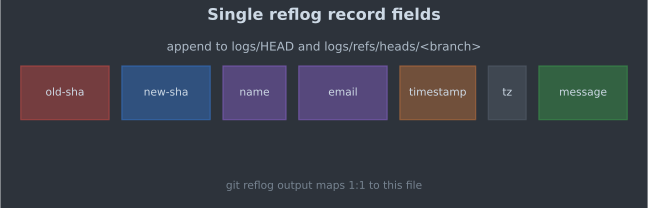
<old-sha> <new-sha> <committer-name> <committer-email> <timestamp> <tz> <message>old-sha:更新前指针;全零表示新建 ref。new-sha:更新后指针。message:如commit:、checkout:、reset:等,可含空格(行末字段)。
git reflog 显示时会缩短 SHA
并格式化时间。
三、hexdump 对照
对一次初始提交后的 .git/logs/HEAD 执行
hexdump -C(以下片段经删减):
00000020  30 30 30 30 30 30 30 30  20 32 62 32 34 62 32 36  |00000000 2b24b26|
00000030  61 31 31 37 65 66 35 63  66 64 62 66 38 38 30 34  |a117ef5cfdbf8804|
...
00000060  6c 69 61 6f 74 6f 6e 67  6c 61 6e 67 40 67 6d 61  |liaotonglang@gma|
00000070  69 6c 2e 63 6f 6d 3e 20  31 37 38 33 31 38 39 36  |il.com> 17831896|
可见
ASCII:0000000000000000000000000000000000000000(old)+
空格 + 2b24b26a…(new)+ 提交者 + 时间戳 + 时区
+ 消息。
复现:
git commit -m 'test'   # 至少一次提交
hexdump -C .git/logs/HEAD | head -8
git reflog
四、典型消息与恢复
| message 前缀 | 典型触发 |
|---|---|
commit: |
git commit |
checkout: |
git checkout / switch |
reset: |
git reset |
merge …: |
快进或合并提交 |
pull …: |
pull 产生的 fetch + merge |
git reflog show master 读
logs/refs/heads/master。找回误删分支:git branch recovered <sha-from-reflog>。
五、与对象可达性
reflog 引用的是对象 ID。即使某 commit 已不在任何分支上,只要 reflog 仍指向它且对象未被 gc prune,commit 仍可达。prune 策略与悬空对象见 第 10、11 篇。
六、本文边界
- 不讨论服务端 reflog(多数托管平台默认不提供用户 reflog)。
- 不写
reflog expire全部配置项。
参考资料
- Git documentation, gitrepository-layout(logs 目录)
- 实验环境:Git 2.54.0
系列索引:Git 内部结构 · 上篇:refs · 下篇:index 格式
同主题继续阅读
把当前热点继续串成多页阅读,而不是停在单篇消费。
【Git 内部】Git 内部结构:对象库与磁盘文件格式
从 .git 目录布局、松散对象与 packfile 格式,到 refs、index、reflog、gc/fsck 与 fetch/push 落地——用官方 format 文档与本地实测 dump 系统讲清 Git 把版本历史存在哪、每个命令改写了哪些文件。全 16 篇。
【Git 内部】.git 目录全景:三棵树与仓库布局
git init 之后 .git 里每个路径干什么?对照 gitrepository-layout 与本地 find 清单,建立 bare/non-bare、三棵树、objects/refs/index 的磁盘级地图。
【Git 内部】松散对象:zlib 载荷与 SHA-1 路径
blob/tree/commit 在磁盘上如何编码?对象头 type size、zlib 压缩、objects/ab/cdef 路径命名,对照 git hash-object 与手工 SHA-1 验证。
【Git 内部】对象图:tree、commit、tag 的链式结构
一次提交在对象库里如何连成链?tree 条目 mode/name/hash、commit 的 tree/parent 字段、annotated tag,用 git cat-file -p 展开并画对象图。