io_uring 在不少 workload 下能显著减少系统调用与批处理开销——但「快」取决于场景与内核代际,不是普适结论。
但他们不说的是:
- 5.4 内核的 SQPOLL 会把一个核烧满——即使你的服务一个请求都没有。
- 5.10 之前的 fixed buffer
有内存泄漏——
io_uring_unregister_buffers()不释放被钉住的页面。 - 5.15 的某个 patch 改了 CQE overflow 语义——你的完成事件可能在静默中消失。
fork()之后你的 io_uring 实例会变成定时炸弹。- 容器里的 io_uring 可能被 Seccomp 直接干掉,而且报错信息让你毫无头绪。
推荐阅读路径(与 io_uring 系列的分工)
| 阶段 | 文章 | 本文关系 |
|---|---|---|
| 概念 | io_uring 核心概念 | 先理解 SQ/CQ、Proactor 与 register 机制 |
| 对比 | io_uring vs epoll、特定场景 epoll 更优 | 选型后再看生产坑,避免「为 io_uring 而 io_uring」 |
| 生产 | 本文 | 版本边界、内核 bug、容器与安全 |
完整目录见 io_uring 系列索引。API 与 Echo Server 实战见 liburing API、Echo Server。
I/O 接口谱系:aio → epoll → io_uring
Linux 异步 I/O 的演进不是「一代比一代快」,而是问题定义在变:
- POSIX AIO / libaio(Linux native
aio):面向真异步磁盘
I/O,但接口不完整——网络 socket
不在支持范围内,且存在 thread pool
模拟、
O_DIRECT约束等工程痛点(见aio(7)、io_setup(2)文档)。 - epoll(2002 起):Reactor /
就绪通知,把「等 fd 就绪」从
poll的 O(n) 扫描里解放出来,成为高并发网络的默认底座;数据搬运仍在用户态read/write里完成。 - io_uring(Linux 5.1,Jens Axboe):Proactor / 完成通知——应用在 SQ 提交「读/写到这块 buffer」,内核异步执行后在 CQ 回报;5.4+ 的 SQPOLL、fixed buffer、5.7+ 网络 opcode 等是后续分叉,不是 5.1 就有。
奠基入口:Axboe, “Efficient IO with io_uring”(Linux Plumbers / LPC 2019 演讲与 slide,描述双环队列设计动机)。本站 02 vs epoll 讨论架构差异;07 反思篇 给出低并发下 epoll 延迟可能更优的反例——谱系不等于性能排序。
版本与环境边界(读本文前先确认)
- 文中坑点与复现代码锚定 upstream 主线 5.4–6.7 及 LTS 5.10 / 5.15 / 6.1;具体行为以各节表格为准。
- 发行版内核可能 backport
特性或额外打补丁——不要只用
uname -r判能力,应使用io_uring_probe(见第三节)。 - 容器另受 Seccomp /
io_uring_disabled约束,与宿主机内核版本正交(见 5.5 节)。 - 本文不包含自测 benchmark 排名;性能数字请引用系列 02、07 或外部可核对来源,不把教程式「快 N 倍」当生产结论。
这是一篇翻车实录。每一条来自可核对的内核变更、CVE 或运维踩坑,附带复现代码与修复方案——不是入门教程。
一、SQPOLL:CPU 烧毁事件
1.1 SQPOLL 模式回顾
IORING_SETUP_SQPOLL 让内核创建一个专用线程
io_sq_thread,持续轮询提交队列(SQ)。好处是应用不需要调用
io_uring_enter() 来提交请求——内核线程自己去 SQ
里取。在理想情况下,这意味着零系统调用的
I/O 路径。
struct io_uring_params params = {0};
params.flags = IORING_SETUP_SQPOLL;
params.sq_thread_idle = 10000; // 10 秒,单位毫秒
int ring_fd = io_uring_setup(256, ¶ms);1.2 问题:一个空闲的服务烧满一个核
上线第一天,监控告警:某台机器一个 CPU 核心 100% 使用率。
top 看到一个内核线程
[io_sq_thread]
吃满了一个核。此时我们的服务刚上线,QPS 约等于零。
$ top -H -p $(pgrep -f our_service)
  PID USER  PR  NI  VIRT  RES  SHR S  %CPU  %MEM  TIME+ COMMAND
 8341 root  20  0  0  0  0 R  99.7  0.0  4:32.11 io_sq_thread
 8340 nobody  20  0  128.5m  12.3m  8.1m S  0.3  0.1  0:01.22 our_service
1.3 根因:5.4 内核的 sq_thread 不休眠
在 Linux 5.4 的早期实现中,sq_thread_idle
参数的行为和文档描述的不一样。
文档说的是:“如果 SQ 在 sq_thread_idle
毫秒内没有新请求,线程进入休眠。”
实际行为(5.4 ~
5.5):线程进入了一个忙等循环(busy-wait
loop),不断检查 SQ tail
指针是否变化。即使它”检测到空闲”,也只是短暂的
cond_resched(),而不是真正的
schedule() 让出 CPU。
// 简化的 5.4 sq_thread 内核逻辑 (fs/io_uring.c)
static int io_sq_thread(void *data)
{
  while (!kthread_should_stop()) {
  if (!io_sqring_entries(ctx)) {
  // 注意:这里不是真正的 sleep!
  cond_resched();
  // 在某些调度配置下,cond_resched() 几乎是 no-op
  continue;
  }
  // 处理 SQE...
  }
  return 0;
}
这个 bug 在 5.6 合并了修复:commit
6c271ce2f1d5。修复后的行为是:空闲超时后线程调用
schedule() 真正让出 CPU,需要应用通过
io_uring_enter(IORING_ENTER_SQ_WAKEUP)
唤醒。
1.4 不同内核版本的 SQPOLL 行为差异
| 内核版本 | sq_thread 空闲行为 | 唤醒机制 | CPU 开销 |
|---|---|---|---|
| 5.4 ~ 5.5 | 忙等,不真正休眠 | 不需要唤醒(它从不睡) | 100% 一个核 |
| 5.6 ~ 5.10 | 超时后 schedule() | IORING_ENTER_SQ_WAKEUP | 空闲时 ~0% |
| 5.11+ | 改进的休眠逻辑 + task_work | sq_thread_idle 更精确 | 空闲时 ~0% |
| 5.19+ | COOP_TASKRUN 协作模式 | 减少 IPI 中断 | 更低的唤醒开销 |
1.5 正确的 SQPOLL 使用姿势
规则一:不要在 5.6 之前的内核上用 SQPOLL。 没有商量余地。
规则二:设置合理的
sq_thread_idle。
struct io_uring_params params = {0};
params.flags = IORING_SETUP_SQPOLL;
params.sq_thread_idle = 2000; // 2 秒:在延迟和 CPU 之间权衡

// 5.11+ 还可以绑定到指定 CPU
params.flags |= IORING_SETUP_SQ_AFF;
params.sq_thread_cpu = 3; // 绑定到 CPU 3
规则三:检查 sq_thread 是否已经休眠,需要时手动唤醒。
// 提交请求前,检查 sq_thread 是否需要唤醒
void submit_with_wakeup(struct io_uring *ring)
{
  // 读取 SQ flags,检查 IORING_SQ_NEED_WAKEUP 标志
  unsigned flags = IO_URING_READ_ONCE(*ring->sq.kflags);

  if (flags & IORING_SQ_NEED_WAKEUP) {
  // sq_thread 已休眠,需要通过 enter 唤醒
  io_uring_enter(ring->ring_fd, 0, 0, IORING_ENTER_SQ_WAKEUP, NULL, 0);
  }

  // 如果用 liburing,这些逻辑已经封装好了:
  // io_uring_submit(ring); // liburing 自动处理唤醒
}
规则四(5.19+):使用
IORING_SETUP_COOP_TASKRUN 减少 IPI
开销。
在 5.19 之前,io_uring 的完成通知通过 IPI(Inter-Processor Interrupt)实现,这会打断目标 CPU 的缓存热度。COOP_TASKRUN 让完成通知延迟到应用主动查询时处理:
params.flags = IORING_SETUP_SQPOLL | IORING_SETUP_COOP_TASKRUN;
// 更进一步:SINGLE_ISSUER 告诉内核只有一个线程提交请求
params.flags |= IORING_SETUP_SINGLE_ISSUER;
1.6 监控和告警方案
#!/bin/bash
# 监控 io_sq_thread 的 CPU 使用率
# 如果连续 30 秒超过 90%,触发告警

THRESHOLD=90
DURATION=30
COUNT=0

while true; do
  CPU=$(ps -eo pid,comm,%cpu --no-headers | grep io_sq_thread | awk '{print $3}' | head -1)
  if [ -n "$CPU" ] && (($(echo "$CPU > $THRESHOLD" | bc -l))); then
  COUNT=$((COUNT + 1))
  if [ $COUNT -ge $DURATION ]; then
  echo "ALERT: io_sq_thread at ${CPU}% CPU for ${DURATION}s" >&2
  # 发送告警到你的监控系统
  COUNT=0
  fi
  else
  COUNT=0
  fi
  sleep 1
done
同时建议在 Prometheus 中加入:
# 通过 node_exporter 的 process collector 抓取
# 或者直接从 /proc/<pid>/stat 解析
cat /proc/$(pgrep io_sq_thread)/stat | awk '{print $14+$15}'
# 输出:utime + stime(单位:clock ticks)
二、Fixed Buffer 的内存泄漏
2.1 io_uring_register_buffers 的工作原理
io_uring_register_buffers()
告诉内核:“这些用户态缓冲区我会反复用于
I/O,请提前处理好。”
内核做了什么:
get_user_pages_fast():把用户态虚拟地址翻译成物理页面,并增加页面引用计数(pin 住页面)。- 记录映射关系:在
io_uring的ctx->user_bufs数组中保存iov和对应的page数组。 - 后续 I/O 跳过映射:当 SQE 指定
IOSQE_FIXED_FILE+ buffer index 时,内核直接使用已经 pin 好的页面,不需要每次都做get_user_pages()+put_page()。
// 注册 fixed buffers
struct iovec iovs[2];
void *buf1 = aligned_alloc(4096, BUFFER_SIZE);
void *buf2 = aligned_alloc(4096, BUFFER_SIZE);

iovs[0].iov_base = buf1;
iovs[0].iov_len = BUFFER_SIZE;
iovs[1].iov_base = buf2;
iovs[1].iov_len = BUFFER_SIZE;

int ret = io_uring_register_buffers(&ring, iovs, 2);
if (ret < 0) {
  fprintf(stderr, "register_buffers failed: %s\n", strerror(-ret));
}
好处是巨大的——对于高频 I/O,省掉每次操作的
get_user_pages() 调用链(涉及 VMA
查找、页表遍历、引用计数原子操作);具体延迟收益随 workload
与硬件变化,本文不做自测量化。
2.2 泄漏场景一:fd 泄漏导致 buffer 永远不释放
这是最常见的场景。io_uring 的 fixed buffers
生命周期绑定在 ring fd 上。只有以下两种方式释放:
- 显式调用
io_uring_unregister_buffers()。 - 关闭 ring fd(
close(ring_fd)),内核在io_uring_release()中释放。
如果你的 ring fd 泄漏了(没有 close),那些 pin 住的页面永远不会释放。
// 泄漏模式:创建 ring,注册 buffer,但忘记清理
void leaky_worker() {
  struct io_uring ring;
  io_uring_queue_init(256, &ring, 0);

  struct iovec iov = { .iov_base = malloc(1 << 20), .iov_len = 1 << 20 };
  io_uring_register_buffers(&ring, &iov, 1);

  // ... 做一些 I/O ...

  // 函数返回了,但没有调用:
  // io_uring_unregister_buffers(&ring);
  // io_uring_queue_exit(&ring);
  //
  // ring fd 泄漏 -> 1MB 页面永久 pin 住
  // malloc 的内存也泄漏了 -> 双重泄漏
}
每调用一次 leaky_worker(),你就损失 1MB
的不可回收内存。长时间运行的服务可以因此 OOM。
2.3 泄漏场景二:5.10 之前的内核 bug——unregister 不释放页面
这是一个内核 bug,不是你的代码问题。
在 Linux 5.4 ~ 5.9
的某些版本中,io_uring_unregister_buffers()
的实现有一个路径不正确调用
put_page()。具体来说,当缓冲区使用了 huge pages
时,io_unpin_pages() 函数没有正确处理 compound
page 的引用计数。
// 复现:注册 -> 取消注册 -> 检查内存
#include <stdio.h>
#include <stdlib.h>
#include <string.h>
#include <sys/mman.h>
#include <liburing.h>

static long get_unevictable_kb(void) {
  FILE *f = fopen("/proc/meminfo", "r");
  char line[256];
  long val = 0;
  while (fgets(line, sizeof(line), f)) {
  if (sscanf(line, "Unevictable: %ld kB", &val) == 1) break;
  }
  fclose(f);
  return val;
}

int main(void) {
  const int BUF_SIZE = 2 * 1024 * 1024; // 2MB,触发 huge page
  const int ITERATIONS = 100;

  long baseline = get_unevictable_kb();
  printf("Baseline Unevictable: %ld kB\n", baseline);

  for (int i = 0; i < ITERATIONS; i++) {
  struct io_uring ring;
  io_uring_queue_init(32, &ring, 0);

  // 使用 mmap 分配,可能触发 transparent huge page
  void *buf = mmap(NULL, BUF_SIZE, PROT_READ | PROT_WRITE,
  MAP_PRIVATE | MAP_ANONYMOUS | MAP_HUGETLB, -1, 0);
  if (buf == MAP_FAILED) {
  // 回退到普通页面
  buf = aligned_alloc(4096, BUF_SIZE);
  if (!buf) continue;
  }
  memset(buf, 0, BUF_SIZE);

  struct iovec iov = { .iov_base = buf, .iov_len = BUF_SIZE };
  io_uring_register_buffers(&ring, &iov, 1);
  io_uring_unregister_buffers(&ring);

  if (buf != MAP_FAILED)
  munmap(buf, BUF_SIZE);
  else
  free(buf);

  io_uring_queue_exit(&ring);
  }

  long after = get_unevictable_kb();
  printf("After %d iterations: Unevictable: %ld kB (delta: %+ld kB)\n",
  ITERATIONS, after, after - baseline);

  if (after - baseline > 1024) {
  printf("WARNING: Possible fixed buffer memory leak detected!\n");
  }

  return 0;
}
在有 bug 的内核上,每次循环会泄漏约 2MB。100 次循环后 Unevictable 会增长约 200MB。
2.4 正确的生命周期管理
// 正确做法:RAII 风格的 ring + buffer 管理

struct ring_context {
  struct io_uring ring;
  struct iovec *bufs;
  int nr_bufs;
  int buffers_registered;
};

int ring_ctx_init(struct ring_context *ctx, int queue_depth,
  int nr_bufs, size_t buf_size)
{
  int ret = io_uring_queue_init(queue_depth, &ctx->ring, 0);
  if (ret < 0) return ret;

  ctx->bufs = calloc(nr_bufs, sizeof(struct iovec));
  ctx->nr_bufs = nr_bufs;
  ctx->buffers_registered = 0;

  for (int i = 0; i < nr_bufs; i++) {
  ctx->bufs[i].iov_base = aligned_alloc(4096, buf_size);
  ctx->bufs[i].iov_len = buf_size;
  if (!ctx->bufs[i].iov_base) {
  ring_ctx_destroy(ctx);
  return -ENOMEM;
  }
  }

  ret = io_uring_register_buffers(&ctx->ring, ctx->bufs, nr_bufs);
  if (ret < 0) {
  ring_ctx_destroy(ctx);
  return ret;
  }
  ctx->buffers_registered = 1;

  return 0;
}

void ring_ctx_destroy(struct ring_context *ctx)
{
  // 顺序很重要:先 unregister,再 exit,最后 free
  if (ctx->buffers_registered) {
  io_uring_unregister_buffers(&ctx->ring);
  ctx->buffers_registered = 0;
  }
  io_uring_queue_exit(&ctx->ring);

  if (ctx->bufs) {
  for (int i = 0; i < ctx->nr_bufs; i++) {
  free(ctx->bufs[i].iov_base);
  }
  free(ctx->bufs);
  ctx->bufs = NULL;
  }
}
2.5 检测方法
方法一:/proc/meminfo 的 Unevictable
字段。
Fixed buffers 被 pin 住的页面会计入
Unevictable 和 Mlocked:
# 监控不可回收内存
watch -n 1 'grep -E "Unevictable|Mlocked" /proc/meminfo'

# 正常服务:Unevictable 应该稳定
# 如果持续增长 -> 可能是 fixed buffer 泄漏方法二:/proc/<pid>/status 的
VmPin 字段(5.10+)。
# 查看进程 pin 住了多少内存
grep VmPin /proc/$(pgrep our_service)/status
# VmPin:  4096 kB  <- 正常:4MB 的 fixed buffers
# VmPin:  1048576 kB  <- 异常:1GB 被 pin 住了
方法三:eBPF 追踪 io_uring_register
调用。
# 用 bpftrace 追踪 register/unregister 的不匹配
bpftrace -e '
kprobe:__io_uring_register {
  @reg[tid] = count();
}
kprobe:io_destroy_buffers {
  @unreg[tid] = count();
}
END {
  printf("Registers: "); print(@reg);
  printf("Unregisters: "); print(@unreg);
}
'
三、内核版本兼容性噩梦
3.1 版本矩阵
io_uring 是 Linux 内核中演进最快的子系统之一。几乎每个内核版本都加了新特性、改了旧行为、修了 bug(也引入了新 bug)。
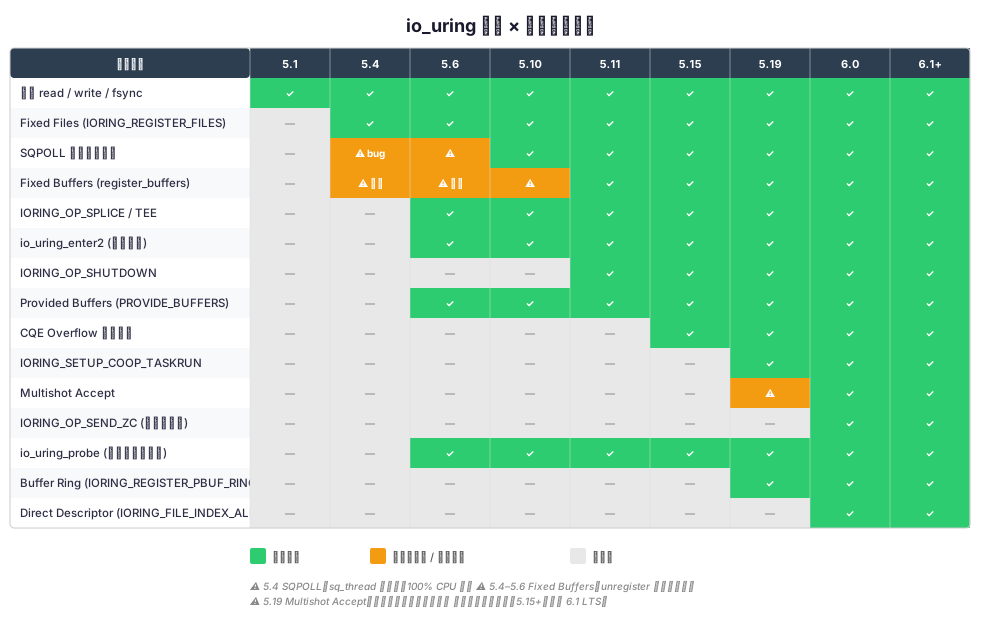
完整列表:
| 内核版本 | 新增特性 | 重要变更 |
|---|---|---|
| 5.1 | 基础 io_uring:read, write, fsync, poll | 初始版本,功能有限 |
| 5.4 | SQPOLL, fixed files, linked SQEs | SQPOLL 有 CPU 烧毁 bug |
| 5.6 | splice, tee, io_uring_enter2, io_uring_probe | SQPOLL 休眠修复;probe API |
| 5.7 | sendmsg, recvmsg, connect, accept | 网络操作支持 |
| 5.10 | provide_buffers, shutdown, renameat | LTS;fixed buffer 泄漏部分修复 |
| 5.11 | IORING_OP_SHUTDOWN, restriction API | 安全限制支持 |
| 5.15 | CQE overflow 新语义,msg_ring | LTS;CQE 不再丢弃 |
| 5.19 | COOP_TASKRUN, SINGLE_ISSUER | 大幅减少 IPI 开销 |
| 6.0 | multishot accept, send_zc | 零拷贝发送 |
| 6.1 | buffer ring (PBUF_RING), direct descriptor | LTS;推荐的最低生产版本 |
| 6.7+ | IORING_SETUP_NO_SQARRAY, incremental buffer consumption | 持续优化 |
3.2 特性检测的正确方式:io_uring_probe
绝对不要通过内核版本号判断 io_uring 的能力。
原因:
- 发行版内核会 backport 特性(RHEL 8 的 4.18 内核有部分 io_uring 支持)。
- 发行版内核也会禁用特性(Ubuntu 默认通过 Seccomp 限制 io_uring)。
- 内核编译配置可以禁用特定功能。
正确做法:用 io_uring_probe:
#include <liburing.h>
#include <stdio.h>

int check_op_supported(int op)
{
  struct io_uring_probe *probe = io_uring_get_probe();
  if (!probe) {
  fprintf(stderr, "io_uring_get_probe() failed: io_uring not available\n");
  return 0;
  }

  int supported = io_uring_opcode_supported(probe, op);
  io_uring_free_probe(probe);
  return supported;
}

void print_feature_support(void)
{
  struct {
  int op;
  const char *name;
  } ops[] = {
  { IORING_OP_NOP,  "NOP" },
  { IORING_OP_READV,  "READV" },
  { IORING_OP_WRITEV,  "WRITEV" },
  { IORING_OP_READ_FIXED,  "READ_FIXED" },
  { IORING_OP_WRITE_FIXED,  "WRITE_FIXED" },
  { IORING_OP_POLL_ADD,  "POLL_ADD" },
  { IORING_OP_ACCEPT,  "ACCEPT" },
  { IORING_OP_CONNECT,  "CONNECT" },
  { IORING_OP_SEND,  "SEND" },
  { IORING_OP_RECV,  "RECV" },
  { IORING_OP_SPLICE,  "SPLICE" },
  { IORING_OP_PROVIDE_BUFFERS, "PROVIDE_BUFFERS" },
  { IORING_OP_SHUTDOWN,  "SHUTDOWN" },
  { IORING_OP_SEND_ZC,  "SEND_ZC" },
  };
  int nr = sizeof(ops) / sizeof(ops[0]);

  struct io_uring_probe *probe = io_uring_get_probe();
  if (!probe) {
  printf("io_uring not available on this system.\n");
  return;
  }

  printf("io_uring feature support (probe reports %d ops):\n", probe->last_op + 1);
  for (int i = 0; i < nr; i++) {
  int supported = io_uring_opcode_supported(probe, ops[i].op);
  printf("  %-20s %s\n", ops[i].name,
  supported ? "\033[32m是\033[0m" : "\033[31m否\033[0m");
  }

  io_uring_free_probe(probe);
}

int main(void) {
  print_feature_support();
  return 0;
}
3.3 运行时特性检测的实用模式
对于需要跨内核版本运行的库或服务,推荐这种模式:
// 启动时探测,运行时分派

struct uring_capabilities {
  int has_sqpoll;
  int has_fixed_files;
  int has_splice;
  int has_accept;
  int has_send_zc;
  int has_multishot_accept;
  int has_coop_taskrun;
};

static struct uring_capabilities g_caps;

int init_uring_capabilities(void)
{
  struct io_uring_probe *probe = io_uring_get_probe();
  if (!probe) return -1;

  g_caps.has_sqpoll  = 1; // flag-based, 需要尝试 setup
  g_caps.has_fixed_files  = 1;
  g_caps.has_splice  = io_uring_opcode_supported(probe, IORING_OP_SPLICE);
  g_caps.has_accept  = io_uring_opcode_supported(probe, IORING_OP_ACCEPT);
  g_caps.has_send_zc  = io_uring_opcode_supported(probe, IORING_OP_SEND_ZC);

  io_uring_free_probe(probe);

  // SQPOLL 和 COOP_TASKRUN 是 setup flags,不是 opcodes
  // 需要尝试创建 ring 来检测
  struct io_uring test_ring;
  struct io_uring_params p = {0};
  p.flags = IORING_SETUP_SQPOLL;
  p.sq_thread_idle = 100;

  if (io_uring_queue_init_params(4, &test_ring, &p) == 0) {
  g_caps.has_sqpoll = 1;
  io_uring_queue_exit(&test_ring);
  } else {
  g_caps.has_sqpoll = 0;
  }

  // 检测 COOP_TASKRUN (5.19+)
  memset(&p, 0, sizeof(p));
  p.flags = IORING_SETUP_COOP_TASKRUN;
  if (io_uring_queue_init_params(4, &test_ring, &p) == 0) {
  g_caps.has_coop_taskrun = 1;
  io_uring_queue_exit(&test_ring);
  }

  return 0;
}

// 根据检测结果选择 I/O 路径
void do_accept(struct io_uring *ring, int listen_fd)
{
  struct io_uring_sqe *sqe = io_uring_get_sqe(ring);

  if (g_caps.has_multishot_accept) {
  io_uring_prep_multishot_accept(sqe, listen_fd, NULL, NULL, 0);
  } else if (g_caps.has_accept) {
  io_uring_prep_accept(sqe, listen_fd, NULL, NULL, 0);
  } else {
  // 回退到 epoll + accept4
  fallback_epoll_accept(listen_fd);
  return;
  }

  io_uring_submit(ring);
}
四、CQE Overflow 和丢失完成事件
4.1 CQ 满了之后会发生什么
完成队列(CQ)有固定大小,默认是 SQ 大小的两倍。当内核产生的完成事件比应用消费的速度快时,CQ 可能满。
这里的行为在不同内核版本之间有本质区别——而且旧行为是灾难性的。
4.2 旧行为(5.15 之前):直接丢弃 CQE
在 5.15 之前,当 CQ 满时,内核的处理是:
// 简化的旧内核逻辑
static bool io_cqring_overflow_flush(struct io_ring_ctx *ctx)
{
  if (io_cqring_is_full(ctx)) {
  // CQ 满了,直接丢弃这个 CQE!
  // 只是递增一个计数器
  ctx->cq_overflow++;
  return false;  // CQE 被丢弃
  }
  // ...
}后果:
- 你的 I/O 完成了,但你永远不知道。read 成功了但没有 CQE 告诉你。
- 文件描述符泄漏:如果你在 CQE 回调中关闭 fd,丢失的 CQE 意味着 fd 永远不被关闭。
- 状态不一致:你的状态机卡在”等待完成”状态,永远等不到。
- 你无法可靠检测到这件事——overflow 计数器是个 hint,但你不知道丢的是哪些操作。
// 灾难场景示例:
// 1. 提交 100 个 read 请求
// 2. 所有 read 完成,但 CQ 只有 64 个位置
// 3. 36 个 CQE 被丢弃
// 4. 你只知道 64 个 read 完成了
// 5. 那 36 个 read 的 buffer 内容是正确的,但你不知道
// 6. 你永远在等那 36 个 CQE,服务挂起
4.3 新行为(5.15+):overflow list
5.15 引入了 overflow list。当 CQ 满时,完成事件不再丢弃,而是放入一个内核端的链表。当应用消费掉一些 CQE、CQ 有空间后,内核自动把 overflow list 中的事件刷回 CQ。
// 5.15+ 的行为
static bool io_cqring_event_overflow(struct io_ring_ctx *ctx,
  u64 user_data, s32 res,
  u32 cflags, u64 extra1, u64 extra2)
{
  struct io_overflow_cqe *ocqe;

  // 分配 overflow 条目(从 slab cache)
  ocqe = kmalloc(sizeof(*ocqe), GFP_ATOMIC);
  if (!ocqe) {
  // 极端情况:内存不足,才真的丢弃
  ctx->cq_extra--;
  return false;
  }

  // 保存到 overflow list
  ocqe->cqe.user_data = user_data;
  ocqe->cqe.res = res;
  ocqe->cqe.flags = cflags;
  list_add_tail(&ocqe->list, &ctx->cq_overflow_list);

  // 设置 overflow 标志,通知用户态
  WRITE_ONCE(ctx->rings->sq_flags,
  ctx->rings->sq_flags | IORING_SQ_CQ_OVERFLOW);
  return true;
}关键变化:
| 行为 | 5.15 之前 | 5.15+ |
|---|---|---|
| CQ 满时的 CQE | 丢弃 | 保存到 overflow list |
| 数据完整性 | 无保证 | 除非 OOM,否则保证 |
| 检测方式 | cq_overflow
计数器 |
IORING_SQ_CQ_OVERFLOW
标志 |
| 性能影响 | 无(代价是正确性) | overflow list 有轻微分配开销 |
4.4 检测 overflow 的方法
// 每次收割 CQE 后检查 overflow
int harvest_completions(struct io_uring *ring)
{
  struct io_uring_cqe *cqe;
  unsigned head;
  int count = 0;

  io_uring_for_each_cqe(ring, head, cqe) {
  handle_completion(cqe);
  count++;
  }
  io_uring_cq_advance(ring, count);

  // 检查是否发生过 overflow
  unsigned sq_flags = IO_URING_READ_ONCE(*ring->sq.kflags);
  if (sq_flags & IORING_SQ_CQ_OVERFLOW) {
  fprintf(stderr, "WARNING: CQ overflow detected! "
  "Consider increasing CQ size.\n");
  // 在 5.15+ 上,overflow 的 CQE 会在下一次有空间时自动刷回
  // 但如果你在 5.15 之前的内核上看到这个... 数据已经丢了
  }

  return count;
}
4.5 正确的 CQ 大小配置
// 方法一:设置 CQ 大小为 SQ 的 4 倍(保守)
struct io_uring_params params = {0};
params.flags = IORING_SETUP_CQSIZE;
params.cq_entries = 4096; // SQ = 1024, CQ = 4096
int ret = io_uring_queue_init_params(1024, &ring, ¶ms);
// 方法二:根据实际并发量计算
// CQ 大小 >= 最大在途请求数 × 2(留安全余量)
// 例如:最多同时 500 个请求 -> CQ 至少 1024(2 的幂,>= 1000)经验公式:
CQ_SIZE = next_power_of_2(max_inflight_requests * 2)

// 例如:
// max_inflight = 100  -> CQ_SIZE = 256
// max_inflight = 500  -> CQ_SIZE = 1024
// max_inflight = 2000 -> CQ_SIZE = 4096规则:永远不要让 CQ 大小等于 SQ 大小。如果你的操作包含 multishot(一个 SQE 可以产生多个 CQE),CQ 要更大。
五、其他生产踩坑
5.1 timeout 操作的 ETIME vs ECANCELED 语义
IORING_OP_TIMEOUT 和
IORING_OP_LINK_TIMEOUT 的 CQE
结果有微妙区别:
// timeout 正常过期:res = -ETIME
// timeout 被 cancel 取消:res = -ECANCELED
// linked timeout 触发(超时了后面的操作):res = -ETIME
// linked timeout 的目标操作先完成:res = -ECANCELED

// 常见错误:把 -ETIME 和 -ECANCELED 混为一谈
void handle_timeout_cqe(struct io_uring_cqe *cqe)
{
  if (cqe->res == -ETIME) {
  // 超时真的发生了
  handle_real_timeout(cqe->user_data);
  } else if (cqe->res == -ECANCELED) {
  // 超时被取消——可能是因为目标操作已完成
  // 这不是错误!不要 log error!
  } else if (cqe->res == 0) {
  // timeout 在指定的完成数达到后正常返回
  // (IORING_TIMEOUT_ABS 或 count-based timeout)
  }
}
5.2 cancel 操作的竞态条件
IORING_OP_ASYNC_CANCEL
不保证能取消目标操作:
// 竞态:你提交 cancel 的时候,目标操作可能已经完成了
//
// Timeline:
// t0: 提交 read (user_data = 42)
// t1: read 完成,CQE 入队
// t2: 你提交 cancel(user_data = 42)
// t3: cancel 的 CQE:res = -ENOENT(找不到目标)
//
// 你会收到两个 CQE:
//  1. read 的 CQE (res = bytes_read)
//  2. cancel 的 CQE (res = -ENOENT)
//
// 如果 cancel 成功:
//  1. read 的 CQE (res = -ECANCELED)
//  2. cancel 的 CQE (res = 0)

// 正确处理:
void handle_cancel_result(struct io_uring_cqe *cqe)
{
  switch (cqe->res) {
  case 0:
  // 成功取消,目标操作会产生一个 -ECANCELED 的 CQE
  break;
  case -ENOENT:
  // 目标操作不存在(已完成或从未提交)
  // 检查是否已经收到了目标操作的 CQE
  break;
  case -EALREADY:
  // 目标操作正在进行,取消已提交但结果不确定
  // 需要等待目标操作的 CQE 来确认
  break;
  }
}
5.3 multishot accept 的 -ENOBUFS 处理
Multishot accept(6.0+)用一个 SQE 持续 accept
连接。但当它收到 -ENOBUFS 时,multishot
会自动停止,你需要重新提交:
void handle_multishot_accept(struct io_uring *ring, struct io_uring_cqe *cqe,
  int listen_fd)
{
  if (cqe->res >= 0) {
  int client_fd = cqe->res;
  setup_client_connection(ring, client_fd);

  // 检查是否还在 multishot 模式
  if (!(cqe->flags & IORING_CQE_F_MORE)) {
  // multishot 结束了!需要重新提交
  resubmit_multishot_accept(ring, listen_fd);
  }
  } else if (cqe->res == -ENOBUFS) {
  // 资源不足,multishot 已停止
  fprintf(stderr, "multishot accept: -ENOBUFS, resubmitting\n");
  resubmit_multishot_accept(ring, listen_fd);
  } else {
  fprintf(stderr, "accept error: %s\n", strerror(-cqe->res));
  }
}

void resubmit_multishot_accept(struct io_uring *ring, int listen_fd)
{
  struct io_uring_sqe *sqe = io_uring_get_sqe(ring);
  io_uring_prep_multishot_accept(sqe, listen_fd, NULL, NULL, 0);
  io_uring_sqe_set_data64(sqe, ACCEPT_TAG);
  io_uring_submit(ring);
}关键:永远检查 IORING_CQE_F_MORE
标志。如果它不在,你的 multishot 已经死了。
5.4 io_uring 和 fork() 的不兼容
这是一个让人崩溃的问题。fork()
之后,子进程会继承父进程的文件描述符,包括 io_uring 的 ring
fd。但:
- SQ/CQ 的内存映射是共享的——父子进程操作同一块内存,没有任何同步。
- 内核的
io_ring_ctx仍然关联到父进程的 task——子进程的操作可能产生不可预期的行为。 - SQPOLL 线程属于父进程——子进程的提交可能被父进程的 sq_thread 处理。
// 危险模式
struct io_uring ring;
io_uring_queue_init(256, &ring, 0);

pid_t pid = fork();
if (pid == 0) {
  // 子进程:ring fd 被继承了!
  // 以下操作全部是未定义行为:
  struct io_uring_sqe *sqe = io_uring_get_sqe(&ring);
  io_uring_prep_nop(sqe);
  io_uring_submit(&ring);
  // 可能导致:段错误、数据损坏、内核 oops
}解决方案:
// 方案一:fork 前关闭 ring
io_uring_queue_exit(&ring);
pid_t pid = fork();
if (pid == 0) {
  // 子进程:重新创建 ring
  io_uring_queue_init(256, &ring, 0);
}

// 方案二:fork 后在子进程中立即关闭 ring fd
pid_t pid = fork();
if (pid == 0) {
  // 立即关闭继承的 ring fd,不做任何 io_uring 操作
  close(ring.ring_fd);
  if (ring.int_flags & INT_FLAG_REG_RING)
  close(ring.enter_ring_fd);
  // ... 子进程的逻辑 ...
}

// 方案三(推荐):使用 CLONE_FILES 的反向操作
// 在创建 ring fd 时设置 close-on-exec
// liburing 默认就是这样做的(如果版本够新)
5.5 容器中使用 io_uring 的安全限制
从 Ubuntu 23.10 开始,默认的 Seccomp 配置禁止
io_uring_setup 和 io_uring_enter
系统调用。Docker 的默认 seccomp profile 也从 20.10
开始限制 io_uring。
# 检查 io_uring 是否被 seccomp 限制
# 如果返回 EPERM 或 ENOSYS,说明被限制了
python3 -c "
import ctypes, os
libc = ctypes.CDLL('libc.so.6', use_errno=True)
# io_uring_setup syscall number (x86_64)
NR_IO_uring_setup = 425
ret = libc.syscall(NR_io_uring_setup, 1, ctypes.c_void_p(0))
err = ctypes.get_errno()
print(f'ret={ret}, errno={err} ({os.strerror(err)})')
# 正常:errno=14 (EFAULT) - 参数无效,但系统调用可用
# 被限制:errno=1 (EPERM) - 权限被拒绝
# 不存在:errno=38 (ENOSYS) - 系统调用不存在
"
在 Docker 中启用 io_uring:
# 方法一:使用自定义 seccomp profile
docker run --security-opt seccomp=custom-profile.json ...

# custom-profile.json 中需要允许:
# - io_uring_setup (425)
# - io_uring_enter (426)
# - io_uring_register (427)

# 方法二:禁用 seccomp(不推荐用于生产)
docker run --security-opt seccomp=unconfined ...

# 方法三:添加特定的 capability
docker run --cap-add SYS_ADMIN ...  # 过于宽泛,不推荐
自定义 Seccomp profile 示例(最小权限):
cat << 'EOF' > iouring-seccomp.json
{
  "defaultAction": "SCMP_ACT_ALLOW",
  "syscalls": [
  {
  "names": ["io_uring_setup", "io_uring_enter", "io_uring_register"],
  "action": "SCMP_ACT_ALLOW"
  }
  ]
}
EOF
注意:注意:上面的 defaultAction: SCMP_ACT_ALLOW 是过于宽松的白名单模式。 生产环境应基于 Docker 默认 Seccomp profile 进行增量修改,只添加 io_uring 需要的系统调用。
5.6 io_uring 的安全漏洞历史
io_uring 是内核安全漏洞的高发区域。Google 的 kCTF 漏洞奖励计划中,大量提交与 io_uring 相关。以下是一些影响较大的 CVE:
| CVE | 内核版本 | 类型 | 影响 |
|---|---|---|---|
| CVE-2021-41073 | 5.10 ~ 5.14 | 类型混淆 | 本地提权 |
| CVE-2022-29582 | 5.15 ~ 5.17 | UAF (use-after-free) | 本地提权 |
| CVE-2022-1043 | 5.4 ~ 5.16 | 引用计数溢出 | 本地提权 |
| CVE-2023-2598 | 6.1 ~ 6.3 | 越界访问 | 本地提权 |
| CVE-2023-21400 | 5.10+ | 权限绕过 | 容器逃逸 |
| CVE-2024-0582 | 6.4 ~ 6.7 | UAF (mmap pages) | 本地提权 |
这就是为什么很多容器运行时默认禁用 io_uring。 攻击面太大,且 io_uring 的代码复杂度高、变更频率高,安全审计难以跟上。
建议:
- 生产环境使用 LTS 内核(6.1 或 6.6),及时应用安全更新。
- 非必要不在容器中使用 io_uring。如果必须用,确保 Seccomp 配置是最小权限。
- 监控 io_uring 相关的 CVE。
- 考虑使用
IORING_REGISTER_RESTRICTIONS(5.11+)限制 ring 能执行的操作类型。
生产部署前检查脚本
在把 io_uring 部署到新机器之前,先跑这个脚本确认环境没有坑:
#!/bin/bash
# io_uring 生产就绪检查脚本
set -euo pipefail

PASS=0; FAIL=0; WARN=0

check() {
  local name="$1" result="$2"
  if [ "$result" = "pass" ]; then
  echo "  是 $name"
  ((PASS++))
  elif [ "$result" = "warn" ]; then
  echo "  注意:$name"
  ((WARN++))
  else
  echo "  否 $name"
  ((FAIL++))
  fi
}

echo "=== io_uring 生产就绪检查 ==="
echo ""

# 1. 内核版本 >= 5.10
KVER=$(uname -r | cut -d- -f1)
KMAJOR=$(echo "$KVER" | cut -d. -f1)
KMINOR=$(echo "$KVER" | cut -d. -f2)
if [ "$KMAJOR" -gt 5 ] || { [ "$KMAJOR" -eq 5 ] && [ "$KMINOR" -ge 10 ]; }; then
  check "内核版本 >= 5.10 (当前: $KVER)" "pass"
else
  check "内核版本 >= 5.10 (当前: $KVER, 建议升级到 6.1 LTS)" "fail"
fi

# 2. io_uring 系统调用未被 seccomp 阻止
if python3 -c "
import ctypes, os, sys
libc = ctypes.CDLL('libc.so.6', use_errno=True)
ret = libc.syscall(425, 1, ctypes.c_void_p(0))  # io_uring_setup
err = ctypes.get_errno()
sys.exit(0 if err == 14 else 1)  # EFAULT=14 说明系统调用可用
" 2>/dev/null; then
  check "io_uring_setup 系统调用可用(未被 seccomp 阻止)" "pass"
else
  check "io_uring_setup 被阻止(检查 seccomp 配置)" "fail"
fi

# 3. SQPOLL 支持检测
if [ -f /proc/sys/kernel/io_uring_disabled ] && [ "$(cat /proc/sys/kernel/io_uring_disabled)" != "0" ]; then
  check "io_uring 被内核参数禁用 (io_uring_disabled=$(cat /proc/sys/kernel/io_uring_disabled))" "fail"
else
  check "io_uring 内核参数未禁用" "pass"
fi

# 4. 检查 /proc/sys/kernel/threads-max(SQPOLL 需要额外内核线程)
THREADS_MAX=$(cat /proc/sys/kernel/threads-max 2>/dev/null || echo "0")
if [ "$THREADS_MAX" -gt 10000 ]; then
  check "threads-max 足够 ($THREADS_MAX)" "pass"
else
  check "threads-max 偏低 ($THREADS_MAX),SQPOLL 模式可能受限" "warn"
fi

# 5. memlock 限制检查(fixed buffers 需要锁定内存)
MEMLOCK=$(ulimit -l 2>/dev/null || echo "0")
if [ "$MEMLOCK" = "unlimited" ] || [ "$MEMLOCK" -gt 65536 ]; then
  check "memlock 限制足够 ($MEMLOCK KB)" "pass"
else
  check "memlock 限制偏低 ($MEMLOCK KB),fixed buffers 可能失败" "warn"
fi

echo ""
echo "=== 结果: $PASS 通过, $WARN 警告, $FAIL 失败 ==="
[ "$FAIL" -eq 0 ] && echo "是 可以部署" || echo "否 请先修复失败项"
把这个脚本存为
check_iouring_ready.sh,新机器上线前跑一遍。特别是容器环境——你以为宿主机 OK 不代表容器里也 OK。
容器环境的陷阱
容器里用 io_uring,坑比裸机多得多。上面 5.5 节讲了 seccomp 限制,这里系统性地梳理一下。
Docker 默认 seccomp profile 阻止 io_uring
Docker 从 20.10 到 23.x 版本,默认的 seccomp profile
不包含 io_uring_setup(syscall
425)。这意味着你的应用跑在裸机上好好的,一放进容器就报
EPERM。
Docker 24+ 才开始在默认 profile 中放行 io_uring(但可能仍受限于发行版配置)。
# 检查当前 Docker 版本
docker version --format '{{.Server.Version}}'

# 临时解决方案:使用自定义 seccomp profile
# 基于 Docker 默认 profile 增量修改,只加三个系统调用
docker run \
  --security-opt seccomp=iouring-seccomp.json \
  your-image:latest

# 或者更简单(但安全性更差):
docker run --security-opt seccomp=unconfined your-image:latest
Kubernetes seccomp 配置
K8s 下需要通过 Pod securityContext 指定:
apiVersion: v1
kind: Pod
metadata:
  name: iouring-app
spec:
  securityContext:
  seccompProfile:
  type: Localhost
  # 这个文件需要放在节点的 /var/lib/kubelet/seccomp/ 下
  localhostProfile: profiles/iouring-allow.json
  containers:
  - name: app
  image: your-image:latest
iouring-allow.json 内容——基于默认 profile
添加:
{
  "defaultAction": "SCMP_ACT_ERRNO",
  "architectures": ["SCMP_ARCH_X86_64"],
  "syscalls": [
  {
  "names": ["io_uring_setup", "io_uring_enter", "io_uring_register"],
  "action": "SCMP_ACT_ALLOW"
  }
  ]
}
注意:这只是增量部分,实际使用要合并到完整的默认 profile 中。
多租户环境的风险
在多租户 K8s 集群里允许 io_uring 要非常谨慎:
- 攻击面大:io_uring 是近年来 Linux 内核 CVE 最密集的子系统(见 5.6 节的 CVE 列表)。允许租户使用 io_uring 等于增大了容器逃逸的攻击面。
- 资源隔离不完善:io_uring 的内核资源(ring buffer、registered files/buffers)不在 cgroup 的控制范围内。一个恶意容器可以创建大量 io_uring 实例消耗内核内存。
- SQPOLL 线程不受 CPU cgroup
限制:
sq_thread是内核线程,它的 CPU 消耗不计入容器的 CPU quota——这是一个已知的隔离缺陷。
建议策略:
- 单租户/可信环境:自定义 seccomp profile 放行 io_uring,内核版本保持最新
- 多租户环境:默认禁止,只对明确需要且经过审计的工作负载开白名单
- 公有云:检查云厂商的 managed K8s 是否支持自定义 seccomp(有些不支持)
六、仍开放的工程问题
cgroup 与 io_uring 资源的隔离。「SQPOLL 的
io_sq_thread不受 CPU cgroup quota 限制」在多租户容器里仍是已知缺口(见 5.5 节);ring buffer、registered files/buffers 也缺少与 memory/IO cgroup 对齐的统一计量——云厂商默认禁用 io_uring 部分出于此顾虑。演进速度与可验证性。「io_uring 是内核变更最密集的子系统之一」(第三节版本矩阵)与 CVE 高发并存;在 6.x 仍快速加 opcode 的前提下,「生产该跟到哪一 LTS、如何与 Seccomp restriction 对齐」没有社区共识,只能按 workload 做版本钉死 + 探针检测。
与 epoll 的长期共存边界。07 反思篇 已给出低并发、海量空闲连接下 epoll 可能更优的证据;何时必须上 io_uring、何时 hybrid 仍依赖场景,缺少跨内核版本的统一决策框架(libevent backend 等集成见 06 篇)。
总结:io_uring 生产检查清单
在把 io_uring 部署到生产之前,过一遍这个清单:
内核版本
SQPOLL
Fixed Buffers
CQ Overflow
安全
兼容性
最后一句话:io_uring 是 Linux I/O 的重要方向,但它今天的成熟度不允许你「开箱即用」。理解限制、选对版本、做好监控——在 workload 与内核代际匹配时,它才值得替代或补充 epoll。
延伸阅读:
- io_uring 系列索引 — 概念 → 对比 → 实战的完整路径
- io_uring 核心概念 · vs epoll · epoll 更优的场景
- eBPF + io_uring:Linux 高性能网络栈的终极形态 — 当 io_uring 遇上 eBPF
- Zero Copy 的肮脏真相 — io_uring SEND_ZC 的隐藏成本
参考资料
规范与文档
- Linux
io_uring_setup(2)、io_uring_enter(2)、io_uring_register(2)— 系统调用语义与 flag 定义 - Linux
aio(7)、epoll(7)— libaio 与 epoll 的能力边界(谱系对照) - Jens Axboe, “Efficient IO with io_uring” — LPC / Linux Plumbers 2019(io_uring 设计动机)
源码
- io_uring 内核源码 — 行为以具体 tag/commit 为准(文中 SQPOLL 修复示例:commit 6c271ce2f1d5)
- liburing — 用户态封装与 probe 辅助
教程与事故线索(B 级,须对照内核版本)
- Lord of the io_uring — 教程;章节与主线内核版本可能滞后
- io_uring CVE 列表 — 安全跟踪
- Google kCTF / security-research — io_uring 漏洞分析线索
读完这篇,下一步读什么
优先读同系列或同问题的下一篇,把单篇消费变成主题集群。
用 io_uring 写一个比 nginx 快的静态文件服务器
特定场景下精心调优的 io_uring 可以超过通用 nginx。我们用 fixed buffers、registered files、SQPOLL 把每个请求的系统调用从 6 个降到 0 个,然后用 wrk 正面 PK。
Zero Copy 的肮脏真相:它什么时候反而更慢
sendfile/splice/io_uring 的 zero-copy 路径深度解析与实测。揭示小数据包场景下传统 copy 因 cache locality 反而更快的反直觉真相。
【存储工程】Direct I/O 与 O_DIRECT:绕过缓存的得与失
O_DIRECT 什么时候该用:双重缓冲、对齐约束、文件系统坑,以及与 io_uring 组合路径的边界。
【io_uring 系列】io_uring 核心原理:Linux 异步 I/O 的新纪元
深入解析 Linux io_uring 的核心机制:提交队列 (SQ)、完成队列 (CQ) 与零拷贝技术,理解它如何重塑高性能网络编程。